
From concept to a Real Application
In Part 3, we reached an important conclusion:
Being authenticated does not mean being authorized everywhere.
An application may have a valid identity and a valid token, but access to Azure resources should still remain constrained by the permissions and resource boundaries approved by the organization. That is why identity, tokens, API permissions and Azure RBAC work together rather than acting as a single universal access pass.
So far, I intentionally kept this series generic. There was a reason.
I was learning and applying these concepts while building an application of my own.
That application is called APRIS AVA™, and you can see a demo at www.aprisava.com.
What Is APRIS AVA™?
APRIS AVA™ is a cloud-based SaaS platform (beta) I am building around a simple problem:
Cloud environments can become difficult to understand once resources, platforms and dependencies begin spreading across multiple parts of Azure.
Azure gives administrators and engineers powerful tools to manage those resources. But someone trying to understand an environment at a higher level may still have to move between multiple screens, services and resource views before the overall picture becomes clear.
APRIS AVA™ is intended to help simplify that experience. At a high level, its purpose is to help an authorized user:
- connect an Azure environment securely;
- understand the cloud resources they are permitted to view;
- organize that information into a clearer model; and
- present the environment visually so that relationships are easier to understand.
The objective is not to replace Azure. It is to make an authorized Azure environment easier to comprehend.
Why the First Three Articles Matter
Before I could think about visualization, I needed to solve a more important problem:
How should an application like APRIS AVA™ connect to another Azure environment without becoming responsible for the user’s Microsoft credentials or receiving unnecessary access?
That question led directly to the concepts covered earlier in this series.
I needed the application to have its own identity. I needed Microsoft to remain responsible for Microsoft authentication. I needed access to stay within approved boundaries. And I wanted the application to follow the principle we discussed in Part 3:
Access should be limited to what is actually required.
That became the foundation.
How I Applied the Approach
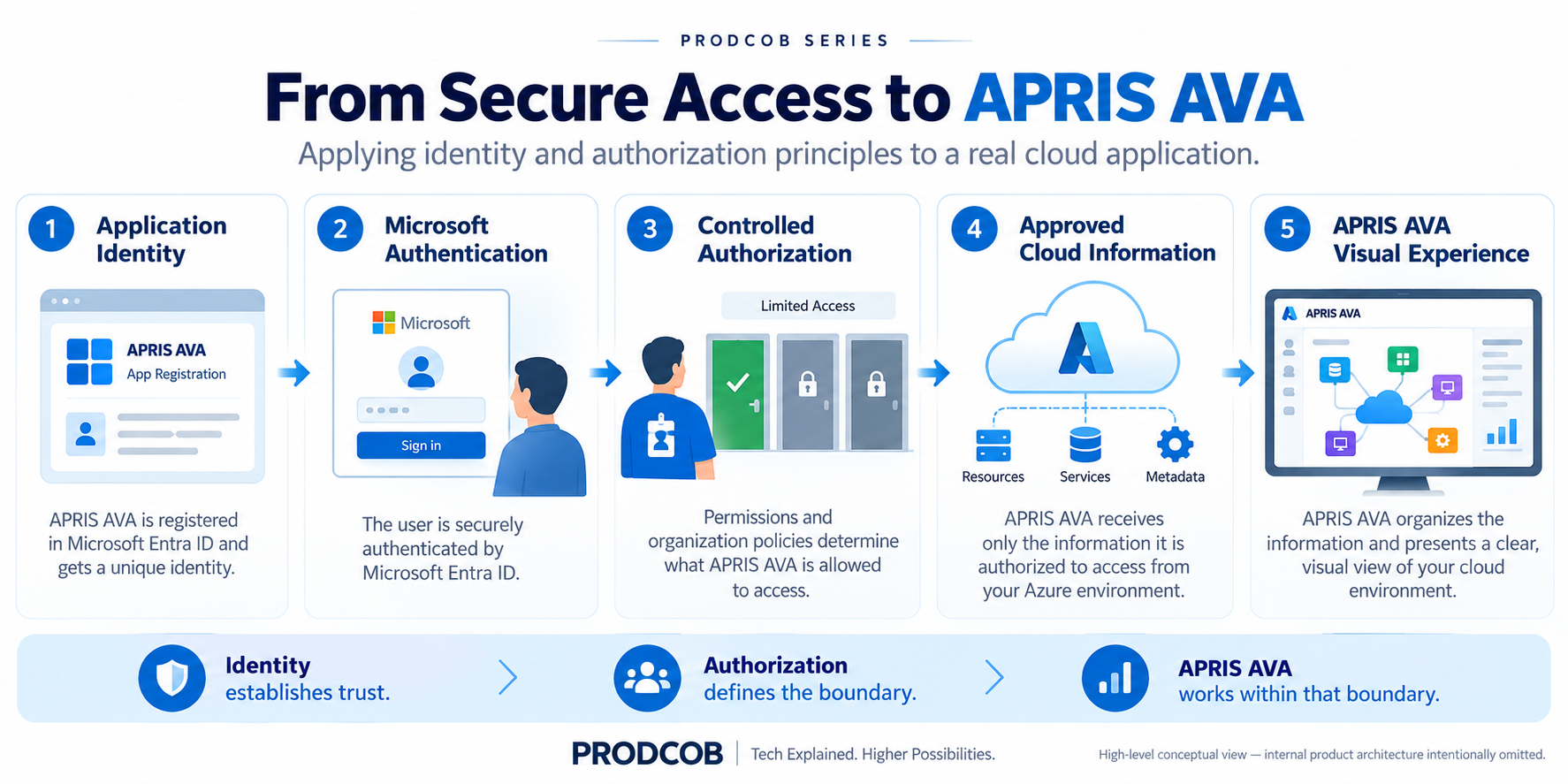
Instead of building a separate Microsoft login mechanism inside APRIS AVA™, I designed the connection around Microsoft’s existing identity and authorization model.
From the user’s perspective, the idea is straightforward.
1. APRIS AVA™ Identifies Itself
The application is registered appropriately with Microsoft so that Microsoft can recognize which application is requesting access. This solves the first question:
Which application is asking?
2. Microsoft Handles Microsoft Authentication
When a user chooses to connect their Azure environment, authentication remains with Microsoft. APRIS AVA™ does not need to become a password collection system. Microsoft can apply the organization’s existing authentication controls.
This maintains an important separation of responsibility:
Microsoft verifies the identity. APRIS AVA™ consumes the resulting authorized connection.
3. Authorization Remains Constrained
This is where Part 3 becomes especially important. A successful sign-in should not mean:
Connect Azure → see everything.
The application should operate only within the access boundaries that have been granted. That gives APRIS AVA™ a very important operating principle:
Respect the customer’s Azure authorization boundary rather than attempting to bypass it.
For a cloud-connected product, I consider that more important than simply proving that the application can connect.
4. APRIS AVA™ Uses the Authorized Information for Its Actual Purpose
Once the secure connection is established, APRIS AVA™ can focus on the problem it is being built to solve: making permitted cloud information easier to understand visually.
At this point, the identity layer has done its job. The authorization layer has defined the boundary. APRIS AVA™ can focus on the user experience. That separation is what I wanted from the architecture.
A Simple Way to Think About It
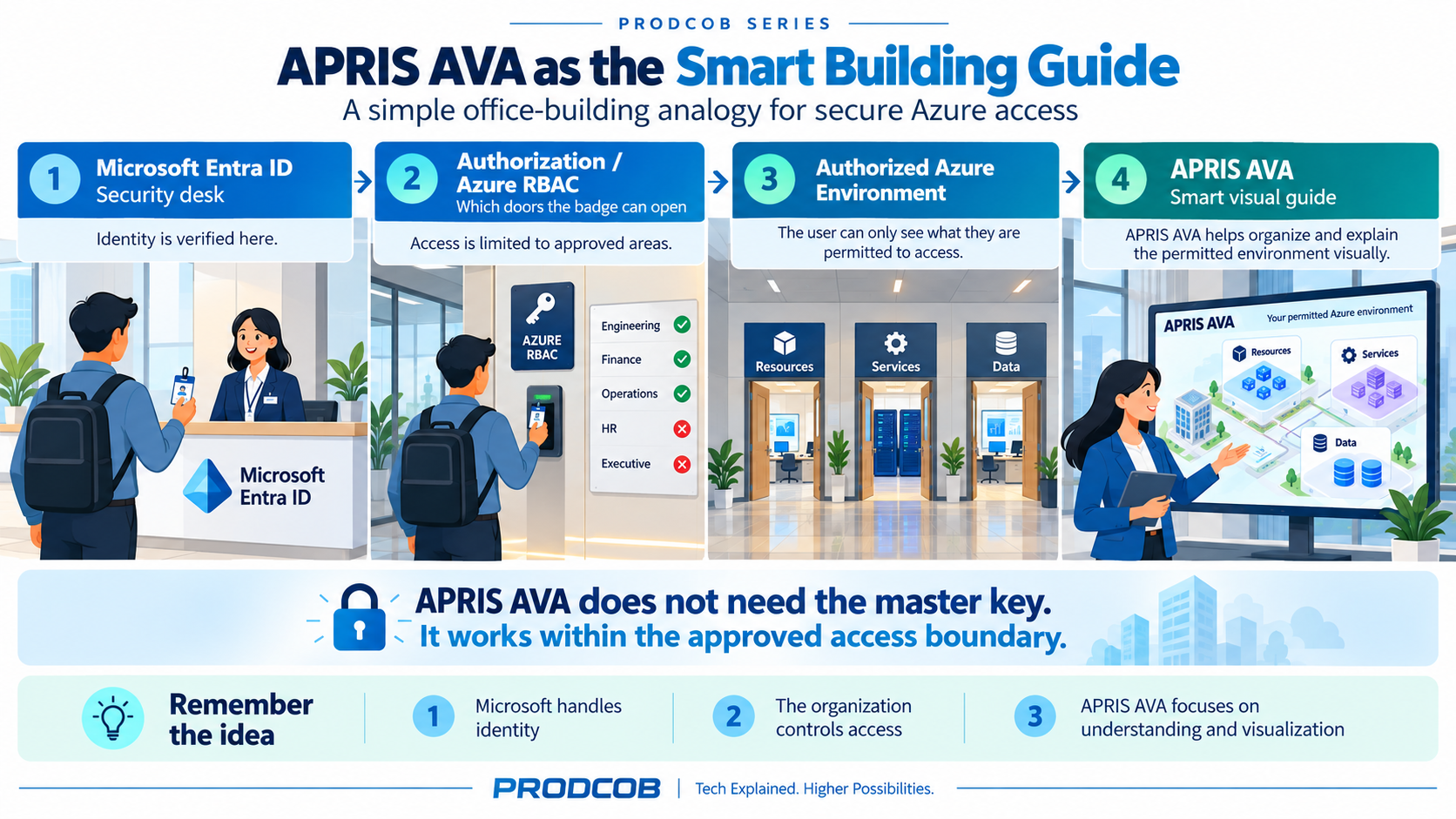
The previous articles used the example of a new employee entering an office building. We can extend that analogy one final time.
Imagine the employee has:
- been identified at the security desk;
- received a valid badge;
- been given access to only the rooms relevant to their role.
APRIS AVA™ is not the security desk. It is also not the person deciding which rooms the employee should enter.
Think of APRIS AVA™ more like a smart building guide. It can help the employee understand the areas they are already permitted to access and how those areas fit together. It does not need the master key to the building.
That is the model I wanted.
What I Deliberately Did Not Want
When thinking about APRIS AVA™, there were several approaches I wanted to avoid.
I did not want the product to depend on customers giving it their Microsoft passwords. I did not want successful authentication to automatically imply unrestricted cloud access. I did not want the application’s core purpose — visual understanding — to become tightly coupled to a home-grown identity system. And I did not want security to become something added after the product was already built.
Instead, identity and authorization needed to be part of the foundation.
What APRIS AVA™ Is Trying to Solve
The longer-term opportunity I see is straightforward.
Cloud platforms are extremely powerful, but their complexity grows with them. As environments expand, the challenge is no longer simply:
What resources do we have?
It also becomes:
How do these pieces fit together? What am I actually looking at? How can someone understand the environment without jumping through many different screens?
APRIS AVA™ is my attempt to explore that problem.
The product is still evolving, so I am deliberately not publishing its internal implementation or proprietary design. But the architectural principle behind the Azure connection is something worth sharing:
Use the cloud provider’s identity and authorization controls for establishing trust, and let the application concentrate on the value it is supposed to provide.
The Series in One Picture
Across these four articles, the progression has been:
- Part 1 — Why not build Microsoft authentication yourself? We separated the web application from the responsibility of authenticating Microsoft users.
- Part 2 — What are Entra ID, Tenant and App Registration? We established identities for the organization and the application.
- Part 3 — What are permissions, access tokens and Azure RBAC? We separated successful authentication from actual resource authorization.
- Part 4 — How does this become useful in a real application? APRIS AVA™ applies those principles so that secure, authorized cloud access can support a simpler visual understanding of an Azure environment.
Final Takeaway
This project changed how I think about connecting an application to a cloud platform.
Initially, it can look like an authentication problem:
How do I connect my application to Azure?
But that is only the beginning. The better questions are:
Who is requesting access? Who authenticates the user? Who determines the authorization boundary? How does the application respect that boundary?
And finally:
What useful experience can the application create once that trust has been established?
For APRIS AVA™, that last question is where the product begins. The identity and authorization layers are the foundation.
The goal is much simpler:
Turn an authorized view of a complex cloud environment into something easier to understand.
Previous: Part 3 — Identity Is Not Authorization: API Permissions, Access Tokens and Azure RBAC Explained