
Definition
Suppose our new employee has successfully checked in. Security knows who they are. They have an employee record. They have a badge number.
Can they now walk into Finance? HR? the data center? the executive floor? every secured room?
Of course not.
This is the difference between Identity and Authorization.
It is also one of the most important distinctions in Azure application architecture.
App Registration Answers One Question
App Registration establishes:
Which application is asking?
It does not automatically mean:
Allow that application to read every Azure subscription.
The Client ID identifies the app. The token is issued for a specific authentication/authorization context. The target API validates that token.
And for Azure resources, Azure RBAC provides another authorization boundary determining what the resulting identity may actually access.
API Permissions = What the Application May Request
Think of API permissions as the access categories associated with an employee’s role.
The application may request access to specific protected APIs or scopes. Examples can include profile information, directory information, selected Microsoft APIs, Azure management APIs, and other protected APIs explicitly configured for the application.
The core design principle should be:
Request only what the application genuinely needs.
That is least privilege in practice.
Access Token = Temporary Security Pass
After authentication and applicable consent/authorization, Microsoft can issue an access token for the intended API.
A temporary digitally signed security pass.
The application presents the token when calling the protected API. This is fundamentally different from repeatedly submitting a username and password.
The token is time-limited, targeted to an intended resource/API context, issued by the identity provider, and validated by the protected API.
Azure RBAC = Which Rooms You Can Actually Enter
Here is the additional layer.
Suppose the app obtains a valid token for Azure management APIs. That does not mean every Azure resource suddenly becomes visible.
Azure RBAC can constrain access at scopes such as Management Group, Subscription, Resource Group, or Individual Resource.
This makes the office analogy more accurate:
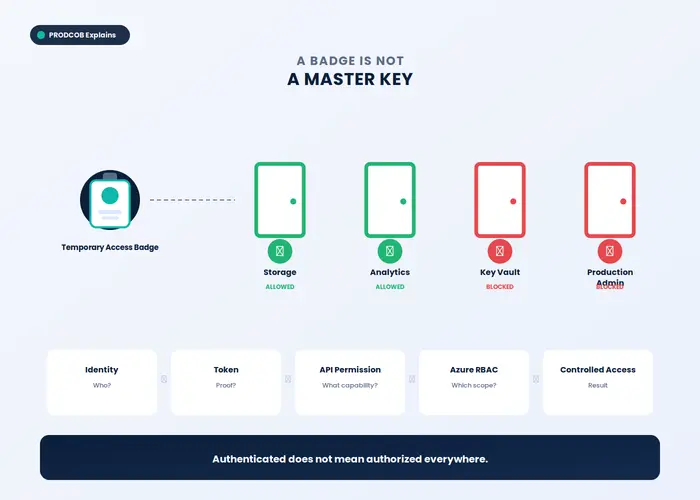
Client ID = which application is standing at the door
Access Token = valid temporary badge
Azure RBAC = which rooms that badge can actually open
Key Insight
A useful architecture equation is:
Identity + Token + Permission + Resource Authorization = Controlled Access
Why This Is an Enterprise Architecture Issue
This is where a prototype and an enterprise application begin to diverge.
A prototype asks:
Can we connect?
An enterprise architecture asks:
Can we connect with the minimum necessary privilege, controlled scope, clear ownership, and sufficient evidence of what happened?
That second question matters much more — especially when a product is intended to inspect infrastructure belonging to another organization.
What This Means for the App
The target architecture should not be:
Connect Azure → See Everything
It should be:
- Connect Azure
- Microsoft authentication
- Explicit consent / authorization
- Token for the intended API
- Approved Azure RBAC scope
- Read authorized metadata
- Build the app resource model
Key Takeaway
The strongest security principle in this entire series may be the simplest:
A valid identity should never be confused with unlimited authorization.
For cloud-connected applications, authentication establishes trust. Authorization defines the boundary of that trust.
Previous: Part 2 — Azure Subscription, Entra ID, Tenant and App Registration — What Does Each One Actually Do?
Next: Part 4 — From Controlled Access to Visual Cloud Understanding — How I Applied the Pattern in APRIS AVA™