
A fast, fresher-friendly guide to choosing the right loading pattern, understanding watermarks and CDC, and debugging the failures that matter in production.
CORE IDEA: Full load starts over. Incremental load remembers where it left off. That memory makes incremental loading efficient – and creates the need for stronger controls.
You should be able to answer these questions after a quick read:
- What is the difference between full and incremental loading?
- When should each approach be used?
- How do watermarking, Change Tracking and CDC detect changes?
- Why do deletes, retries, late data and schema changes cause problems?
- How do ADF and Databricks fit together?
- How do you debug a pipeline that is red – or worse, green but wrong?
Estimated read time: 10-15 minutes
1. Full Load vs Incremental Load
| FULL LOAD – Start over | INCREMENTAL LOAD – Remember |
|---|---|
| Move or replace the complete dataset every run. Simple to reason about, but expensive as data grows. | Move only new or changed data since the last successful run. Efficient, but the pipeline must track state correctly. |
Three analogies
- Mailbox: full load gathers years of old mail again; incremental load collects only today’s new envelope.
- Phone contacts: full load re-enters all 500 contacts; incremental load updates the one friend whose number changed.
- 100-page document: full load rewrites the whole document; incremental load corrects the single changed word.
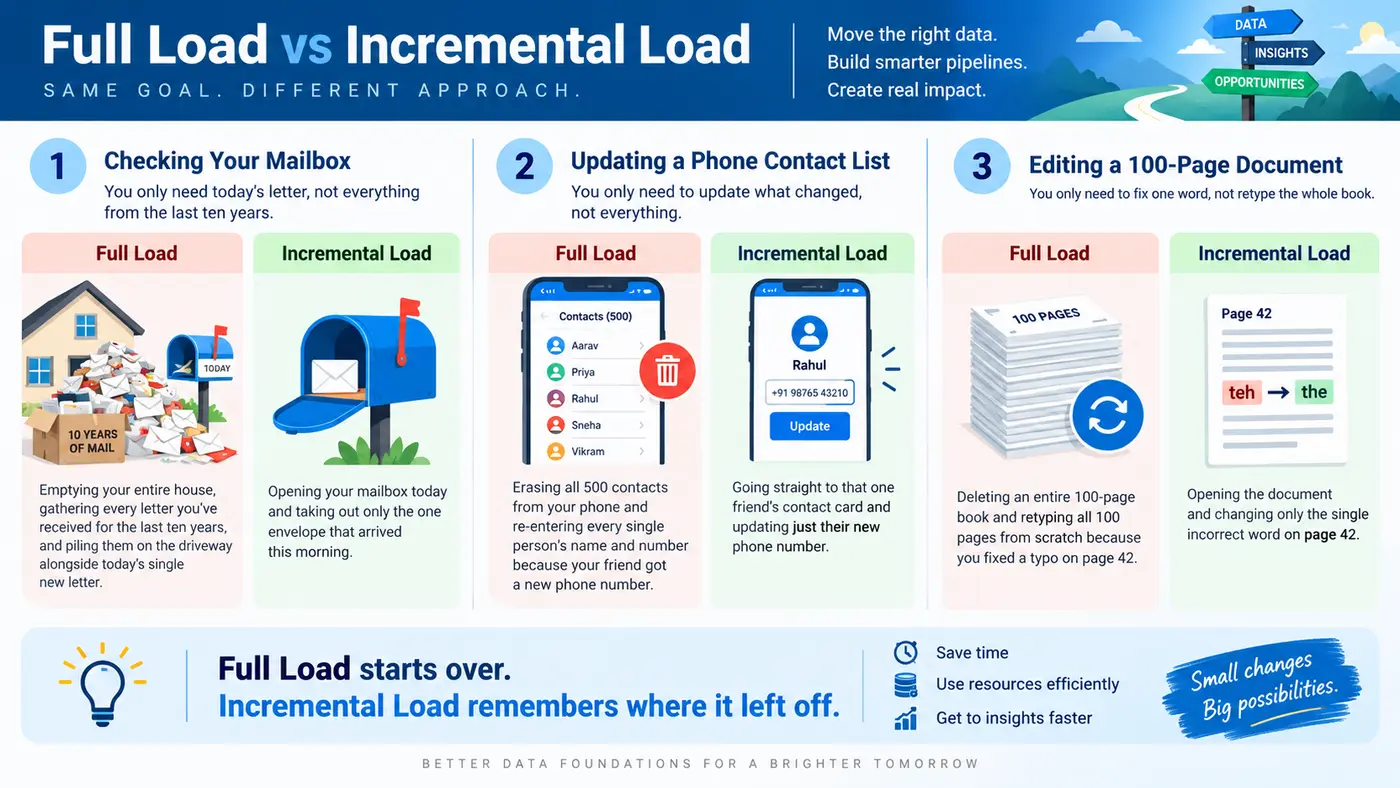
REMEMBER: Incremental loading is not automatically better. It is better only when the savings justify the added state-management and recovery complexity.
2. When Should You Use Each Approach?
| Use Full Load When | Use Incremental Load When |
|---|---|
| The dataset is small or stable. | The dataset is large and only a small portion changes. |
| Refreshes are infrequent. | Loads run frequently. |
| A complete snapshot is needed. | Source-system or network impact must be reduced. |
| The source has no reliable change signal. | A reliable ModifiedDate, sequence, Change Tracking or CDC signal exists. |
| Simple recovery is more valuable than optimization. | API limits, cost or freshness requirements matter. |
DECISION RULE: Do not build CDC, watermark tables and replay logic around a tiny reference table just because incremental loading sounds more advanced.
A safer full-load pattern
Avoid treating TRUNCATE + COPY as automatically safe. If the truncate succeeds and the copy fails, consumers may see an empty or partial table.
| Risky | Safer |
|---|---|
| TRUNCATE target -> COPY source | COPY source -> STAGING -> VALIDATE -> PUBLISH / SWAP / MERGE -> target |
ANALOGY: Do not throw away all your furniture before confirming the replacement furniture has arrived.
3. How Incremental Loading Remembers
The pipeline needs a reliable change signal and a reliable record of what was already processed.
| Method | Simple meaning | Best fit / caution |
|---|---|---|
| Timestamp watermark | Load rows where ModifiedDate is between old and new boundaries. | Good if ModifiedDate always changes when the row changes. |
| Increasing ID | Load IDs greater than the last processed ID. | Good for append-only data; it misses later updates to old IDs. |
| SQL Change Tracking | Ask the database which rows changed since a version. | Useful when inserts/updates/deletes need to be identified. |
| CDC / Change Data Feed | Read actual row-level changes such as insert, update and delete. | Stronger change history; requires checkpoint/retention discipline. |
| File timestamp / partition | Load only new or changed files/folders. | Useful for ADLS; very large file listings may still be costly. |
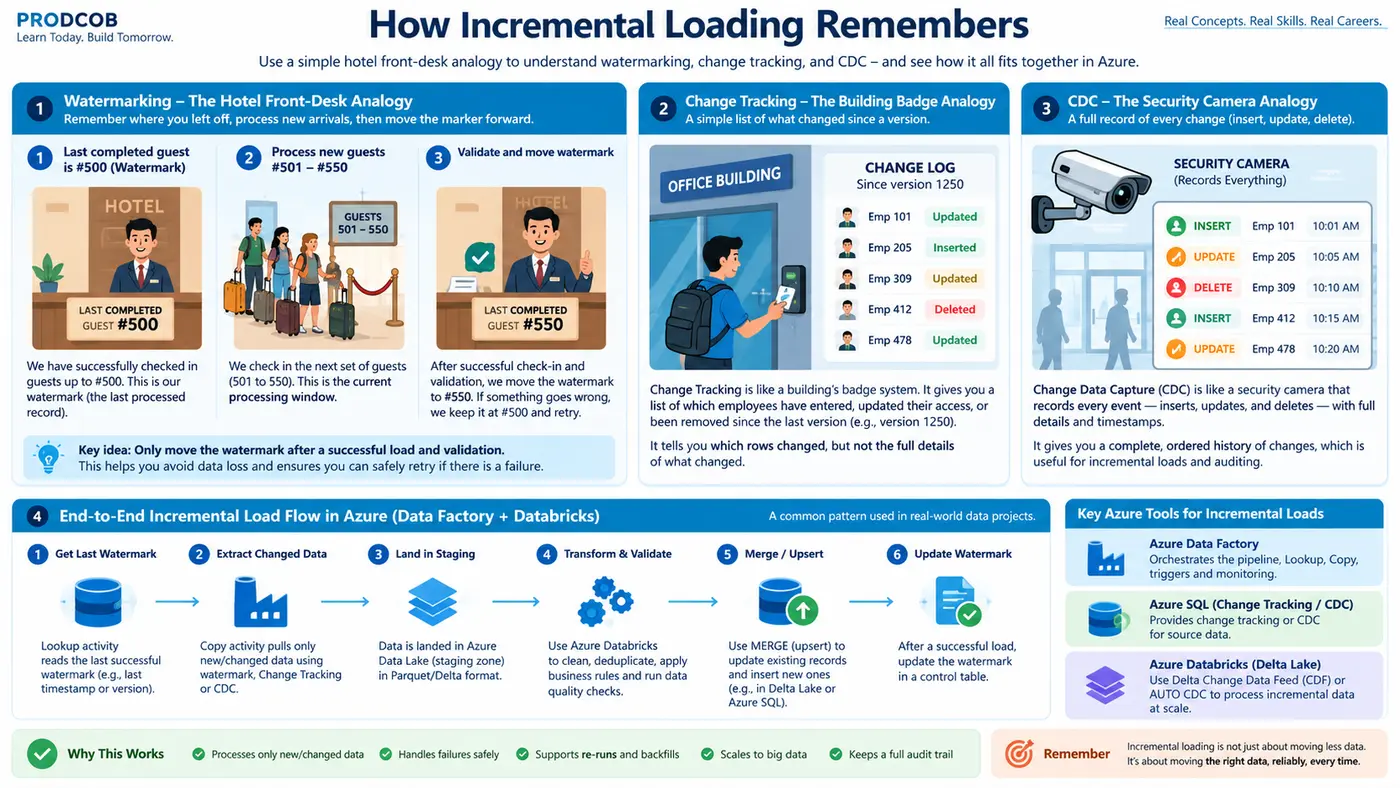
GOLDEN RULE: Update the watermark only after the load, merge and reconciliation succeed. The watermark should mean: “everything through this boundary was successfully processed.”
4. What Happens After Changed Data Is Found?
Finding changed rows is only half the job. The destination still needs a safe rule for applying them.
| Concept | Plain-English explanation | Why it matters |
|---|---|---|
| Append | Always add new rows. | Simple, but wrong for updates unless the dataset is truly append-only. |
| Upsert / MERGE | Update an existing key; insert a new key. | Prevents many duplicate and stale-record problems. |
| Idempotency | Reprocessing the same batch should not corrupt the target. | Makes retries safe after network or compute failures. |
| Soft delete | Keep the row but mark it deleted. | Lets incremental logic see the deletion. |
| Backfill | Reprocess a specific historical window. | Fixes old data without rebuilding all history. |
Four production traps every fresher should know
- Hard deletes: a timestamp query cannot find a row that no longer exists. Use soft deletes, Change Tracking/CDC or reconciliation.
- Retries: the source may have committed successfully even when the pipeline thinks it failed. Design for safe replay.
- Late-arriving data: an old event can arrive after the watermark has moved past its event time. Use lookback windows, ingestion time, deduplication or CDC.
- Wrong business key: MERGE can run perfectly and still overwrite the wrong record if the matching key is poorly chosen.
QUICK CHECK: If an OrderID is always increasing, can it detect an update to an older order? No. An ID watermark detects new rows, not later changes to old IDs.
5. Schema Evolution and Data Quality
Real systems change. New columns appear, datatypes change, files arrive malformed and upstream values break assumptions.
| Issue | What can happen | Typical response |
|---|---|---|
| New column | Pipeline fails or the new field is ignored. | Use controlled schema drift/evolution and review governance impact. |
| Datatype change | Conversion errors or bad values. | Validate schema contracts and types before promotion. |
| Malformed file | Parsing failure or rejected records. | Quarantine bad files/rows; do not silently discard them. |
| Rows read != rows written | Pipeline may still look healthy. | Reconcile counts, keys, rejects, min/max dates and critical totals. |
MOST IMPORTANT PRODUCTION LESSON: A green pipeline does not prove the data is correct.
Minimum reconciliation checks
- Source, stage and target row counts
- Distinct business-key count and duplicate count
- NULL key count
- Min/max event or update timestamp
- Rejected-row count
- Critical financial or business totals where relevant
Azure / Databricks connection
ADF exposes copy metrics such as rows read and written. Databricks can apply data-quality expectations and schema-evolution controls; Unity Catalog adds governed access, lineage, row filters and column masks.
6. What Breaks in Incremental Loads?
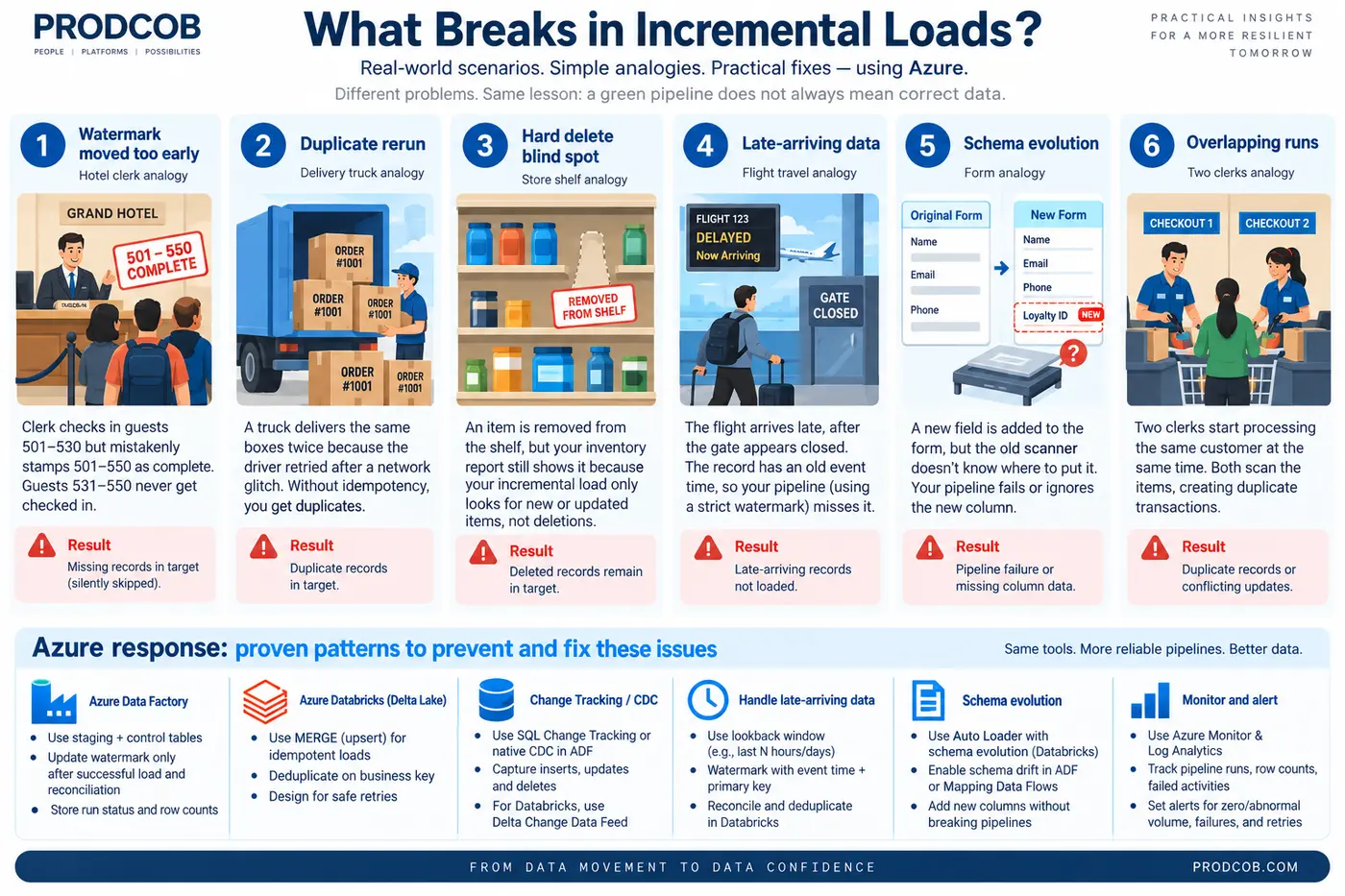
Top failure patterns to recognize
| Failure | What you see | Think first |
|---|---|---|
| Watermark advanced too early | Missing records | Did state move before the batch was fully validated? |
| Watermark never advances | Same rows every run | Did the control-table update fail? |
| Duplicate rerun | Duplicate target rows | Is the write idempotent / upsert-based? |
| Overlapping runs | Duplicates or conflicting updates | Are two runs sharing the same state window? |
| Hard delete | Stale row remains in target | Can the chosen change method detect deletes? |
| Backdated / late row | Record never loads | Did it arrive outside the watermark window? |
| Schema drift | Failure or missing columns | Did the source structure change? |
| API first page only | Pipeline succeeds but rows are missing | Is pagination configured? |
| IR / network / secret issue | Connection or authentication failure | Check infrastructure before changing pipeline logic. |
| Volume suddenly zero | Pipeline can still be green | Check source delay, filter, watermark and volume alerts. |
7. Debug ADF in a Fixed Order
Do not click randomly through activities. Work from orchestration to data to infrastructure.
- Did the trigger fire?
- Did the pipeline run start?
- Which activity failed – or unexpectedly succeeded?
- Did the source return the expected rows?
- How many rows were read, written and rejected?
- What were the old and new watermark values?
- Was the Integration Runtime healthy?
- Are authentication, secret, network, DNS or firewall settings healthy?
- Did the source query or sink become slow or blocked?
- Did reconciliation pass?
FOR SILENT FAILURES: If the pipeline is green, compare expected volume, source vs target counts, watermark movement, duplicate counts and late records.
Useful operational signals
| Signal | Why watch it |
|---|---|
| Pipeline / activity / trigger run status | Confirms orchestration health. |
| Rows read / written / skipped | Shows whether data moved as expected. |
| Duration / throughput | Helps separate source, network and sink bottlenecks. |
| Watermark movement | Shows whether incremental state is progressing. |
| Zero / abnormal volume alerts | Catches green-but-wrong executions. |
| Integration Runtime health | Critical for on-premises connectivity. |
8. Where Azure Data Factory and Databricks Fit
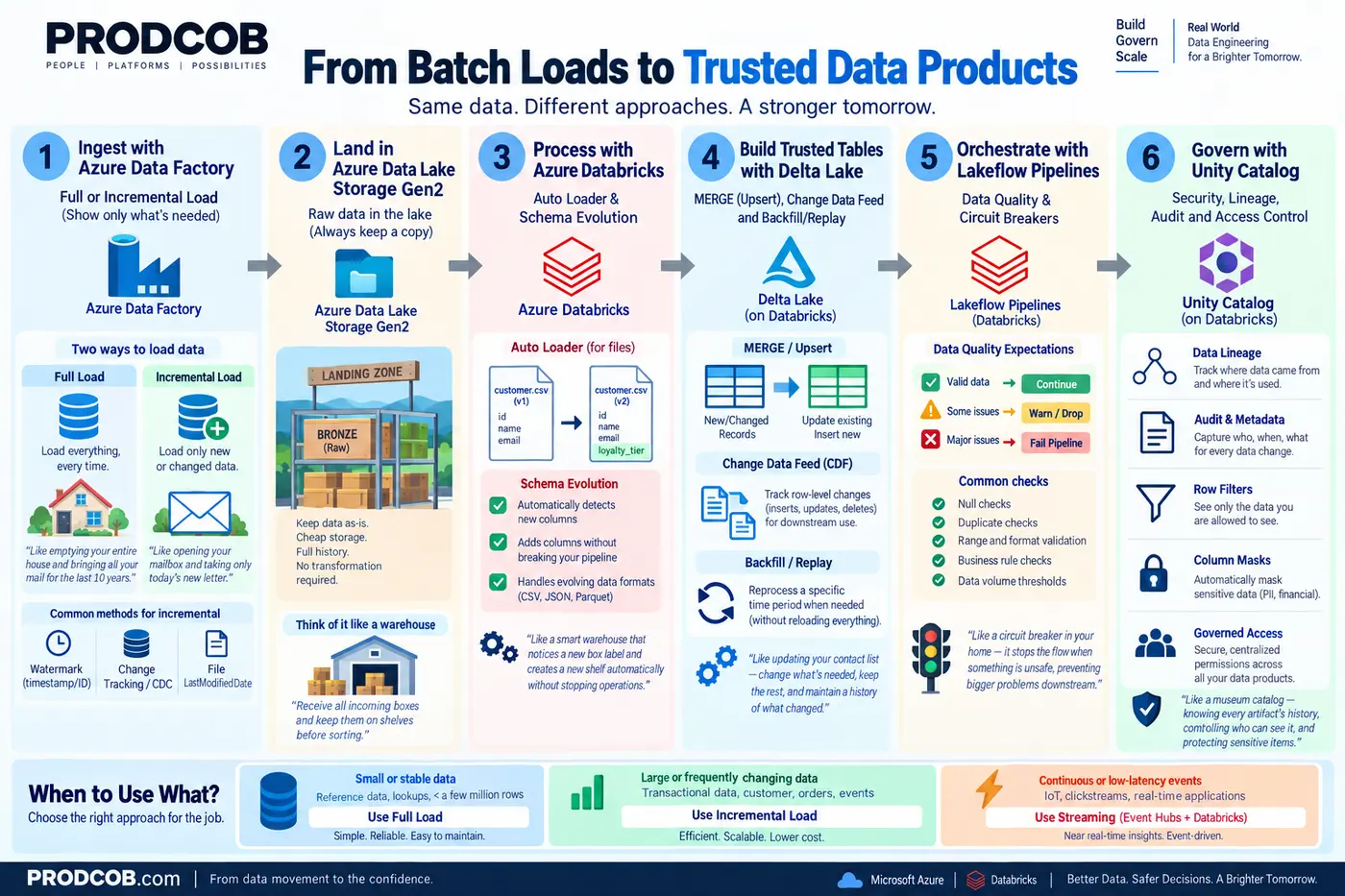
| Platform | Typical role in this pattern |
|---|---|
| Azure Data Factory | Orchestration, connectivity, scheduling, Copy Activity, parameterized pipelines and monitoring. |
| ADLS Gen2 | Landing / raw storage; keep recoverable source history where appropriate. |
| Azure Databricks | Large-scale transformation, deduplication, Auto Loader, streaming, schema handling and quality logic. |
| Delta Lake | MERGE/upsert, reliable tables, Change Data Feed and replay-friendly processing. |
| Unity Catalog | Permissions, lineage, audit metadata, row filtering and column masking. |
ARCHITECTURE RULE: Use the tool because it solves a requirement, not because it exists. ADF and Databricks overlap in some capabilities.
When batch is no longer enough
If the business needs decisions within seconds, continuously polling ADF may stop being the natural design. Event Hubs or Kafka with Databricks Structured Streaming can be more appropriate for true event-driven processing.
9. Fresher Practice: Learn by Breaking the Pipeline
One broken pipeline can teach more than ten perfect demos.
| Lab | Break it on purpose | What the student should discover |
|---|---|---|
| 1 | Advance the watermark before target completion. | Why records can be silently skipped. |
| 2 | Rerun the same batch. | Why idempotency and MERGE matter. |
| 3 | Hard-delete a source row. | Why timestamp watermarks cannot see physical deletes. |
| 4 | Insert a backdated transaction. | How late data bypasses a strict watermark. |
| 5 | Add a new source column. | How ADF / Databricks react to schema evolution. |
| 6 | Run two pipeline instances together. | How overlapping windows create duplicates or state conflicts. |
| 7 | Take the Integration Runtime offline. | How infrastructure failures differ from code failures. |
| 8 | Return only page 1 from an API. | Why a pipeline can succeed with incomplete data. |
Five interview questions to practice
- How would you implement incremental loading when there is no ModifiedDate?
- How would you capture hard deletes?
- What happens if the pipeline fails after some rows were committed?
- Why can an increasing ID be unsafe for updates?
- How would you debug a pipeline that succeeded but loaded fewer rows than expected?
10. One-Page Cheat Sheet
| Concept | Remember this |
|---|---|
| Full load | Move everything. Simple state model. More data movement. |
| Incremental load | Move only changes. Requires reliable state and recovery. |
| Watermark | Last successfully processed boundary – not merely the latest value seen. |
| Change Tracking | Database tells you which rows changed since a version. |
| CDC / CDF | Capture row-level insert, update and delete changes. |
| Append | Add rows only. Good for truly append-only data. |
| MERGE / Upsert | Update matching keys and insert new keys. |
| Idempotency | Rerunning the same batch must not corrupt the target. |
| Late data | Use lookback, ingestion time, dedupe, CDC or reconciliation. |
| Schema evolution | A new column can be a technical issue and a governance issue. |
| Backfill | Reprocess a historical window without destroying the normal checkpoint. |
| Reconciliation | Pipeline success is not data success. Prove completeness. |
TWO RULES TO KEEP: 1) Never advance the watermark until the represented data is successfully processed and validated. 2) Never trust pipeline success without data reconciliation.
Final mental model
Full loading pays for simplicity with volume. Incremental loading pays for efficiency with state-management complexity.
The production question is not “Can we move only what changed?” It is “How do we prove that we captured every change that mattered?”