
Definition
A common problem when first designing an Azure-connected application is that these terms appear together:
Azure Subscription. Entra ID. Tenant. App Registration. Client ID.
They can look like different names for roughly the same thing.
They are not. Each solves a different problem.
The office-building analogy makes the separation easier to remember.
Azure Subscription = The Office Space
Your Azure subscription is primarily a boundary in which Azure resources are created, organized, governed, and billed.
The company’s leased office space.
Inside it might be: Resource Groups, Storage, Databases, Databricks, Key Vault, Networking, and other Azure services.
For the application, this becomes something the product may eventually inspect.
The Pay-As-You-Go subscription created for development is not app’s authentication mechanism. It provides an Azure environment in which resources can be created, tested, and observed. That distinction matters.
Microsoft Entra ID = The Security Organization
Microsoft Entra ID handles identities and access-related functions.
In the office analogy:
Entra ID is the security organization running the front desk.
It helps establish things such as: who is signing in, which organization they belong to, which application is requesting authentication, and what security policies apply.
Authentication starts here.
Tenant = The Company’s Identity Directory
Now imagine that one security system manages access for thousands of companies. It needs to know which company each employee belongs to.
That company-specific identity environment is the tenant.
The organization’s private company directory.
It contains identities such as users, groups, applications, enterprise application objects, and organizational identity policies.
So if Entra ID is the identity/security platform, the tenant is the organization’s identity home inside that platform.
App Registration = The Application’s Employee Record
Humans are not the only entities that need identities. Applications do too.
When the app is registered with Microsoft Entra ID, Microsoft creates an application identity.
HR registering a new employee in the corporate system.
Microsoft now knows: the application name, the home tenant, the Application/Client ID, approved redirect locations, configured authentication settings, and configured permission requests.
Without App Registration, Microsoft does not have the application identity needed for the authentication flow.
Client ID = Badge Number
Once an employee exists in the company directory, they receive an employee number. An application gets something similar: the Application (Client) ID.
This does not give the application permission to everything. It identifies the application making the request.
Client ID tells security which application badge is standing at the door.
It does not tell security that the application owns the entire building.
Key Insight
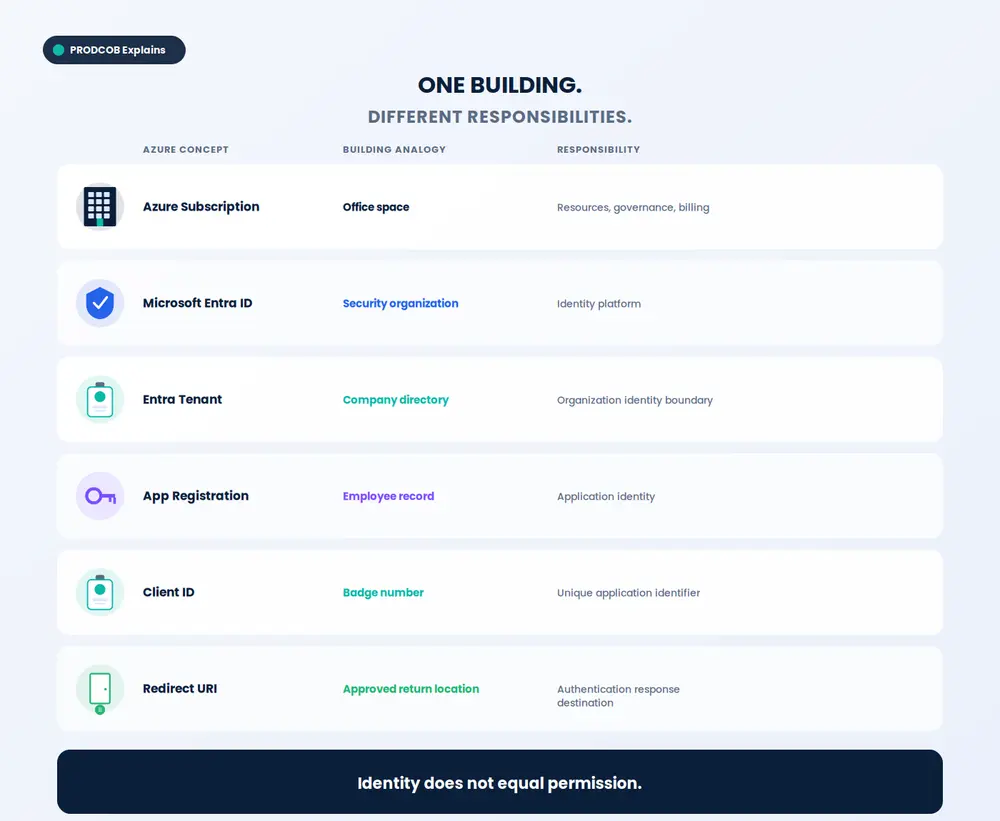
The architecture becomes much easier once the responsibilities are separated.
| Azure Concept | Office-Building Analogy | Responsibility |
|---|---|---|
| Azure Subscription | Office space | Resources, governance and billing |
| Microsoft Entra ID | Security organization | Identity platform |
| Entra Tenant | Company directory | Organization identity boundary |
| App Registration | Employee record | Application identity |
| Client ID | Badge number | Unique application identifier |
| Redirect URI | Approved return location | Authentication response destination |
Executive Perspective
This distinction matters well beyond Microsoft terminology.
Enterprise architecture works better when we separate identity, authorization, resource ownership, and business capability.
When those concerns become tangled, systems become harder to secure, govern, and scale.
The vocabulary may be Azure-specific. The design principle is not.
Key Takeaway
Remember this:
The subscription contains the resources. The tenant contains identities. App Registration gives your application an identity. The Client ID tells Microsoft which application it is.
None of those, by itself, means:
“Allow this application to access everything.”
That is the next layer.
Previous: Part 1 — Why I Wouldn’t Build Microsoft Authentication Into My Web Application
Next: Part 3 — Identity Is Not Authorization: API Permissions, Access Tokens and Azure RBAC Explained